ASTER 2.26.3 (1.2.23.52.32.8.1.3.24)
This post was published 5 years ago. Download links are most likely obsolete. If that's the case, try asking the uploader to re-upload.
ASTER 2.26.3 (1.2.23.52.32.8.1.3.24)|Windows(x86/x64)|rar|109 mb
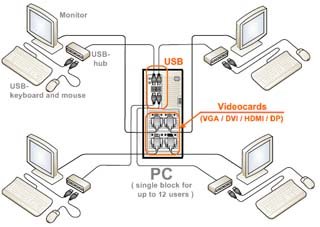
Need another computer for an employee or friend, but there isn’t enough money to buy PC or no places to put it? Aster will help you out! Aster is a multi-user extension for Windows 7/8/10: to get another workplace – just connect to system unit one more monitor, mouse, keyboard and run Aster.
Attention!
Dear users! We do not forget about our rights holders!
All portable assembly, designed exclusively for the promotion of the software and can be used for informational purposes only!
After testing the program and decide on the usefulness and necessity of you, this software - you are required! remove the assembly and turn to the developer, to purchase a license for a full version. Good luck!
Work on Windows 10 is POSSIBLE, BUT NOT GUARANTEED!
Release Notes
ASTER is a program (and only a program!) which allows to create a few workplaces on base of a single PC.
ASTER is a multiseat software for Windows XP/7/8/10. ASTER does not use any thin clients and terminal stations, i.e. ASTER is analog of such multiseat programs, as MS MultiPoint, SoftXpand, Betwin, Userful, etc. ASTER is being successfully used not only for equipping of computer classes, libraries, offices and Internet cafes, but even for games and video!
To create an additional workplace - you just connect 1 more monitor (you can connect to same video card), keyboard and a mouse to your computer (and if it is needed - microphone, speaker, joystick or gamepad).
Monitors may be connected by VGA/DVI/HDMI/DP cables. IT is also possible to use external monitors (preferably DisplayLink monitors) via USB or WIFI/LAN connections. After installing and launching, ASTER will provide each users with its own independent desktop.
Benefits of ASTER:
• Low noise level
• Space is saved
• Upgrading costs are cut down
• Easy application
• Electric power is saved
• Local network is not required
• Environmentally friendly
Differences as compared to a similar multiseat software:
• Unlike a terminal station or a thin client, excellent operation with graphic applications
• Free trial
• Low price
• Compatibility with most modern video cards
• Ideal solution for cost-effective computerization of schools, government bodies and SOHO
NEW
2.26.3 27-02-2020
• Added the ability to use of keyboards power buttons.
2.26.2 21-01-2020
• Fixed error starting ASTER service.
• fixed problem with Windows Search service.
• Some bugs fixed.
2.26.1 12-09-2019
• Fixed a problem with RDP connections in Windows 10 version 1903 (build 18362).
• Fixed error 1 (3033929) on Windows 7 version 6.1.7601.24519.
v2.26 15-07-2019
• Added ability to assign smartcard readers (can not be assigned through the assigned of USB hubs).
• Added a warning message when at once logging on under the same account at different places.
• Changes in the new scheme of driver loading to correct some causes of error 2 (-10).
• Added support for WDDM 2.5/2.6 (DirectX 12).
• Changes in the algorithm for turning on "extinguished" monitors to reduce screen blinking when changing video mode (for Windows 8/10).
Release New
Homepage
System Requirements
- Restrictions: It does not correspond to the tablet mode.
- CPU: Intel® Pentium 4 or later / AMD Athlon 64 or later (900 MHz or greater)
- (64bit support recommended)
- Memory: 4GB or more (Recommend 8GB or more)
- HDD: 10GB or more of free disk space
- Display: XGA (1,024x768), Full Color (24 bit or higher), 16-bit display (32-bit recommended)
Windows XP, Windows Vista all SP, Windows 7, Work on Windows 10 is POSSIBLE, BUT NOT GUARANTEED!
Quick check before we show the links
Helps us keep automated scrapers from hammering the filehosts.