Win10PE SE v1.0.0.0 (September 1, 2016) [by TheOven/ChrisR]
This post was published 9 years ago. Download links are most likely obsolete. If that's the case, try asking the uploader to re-upload.
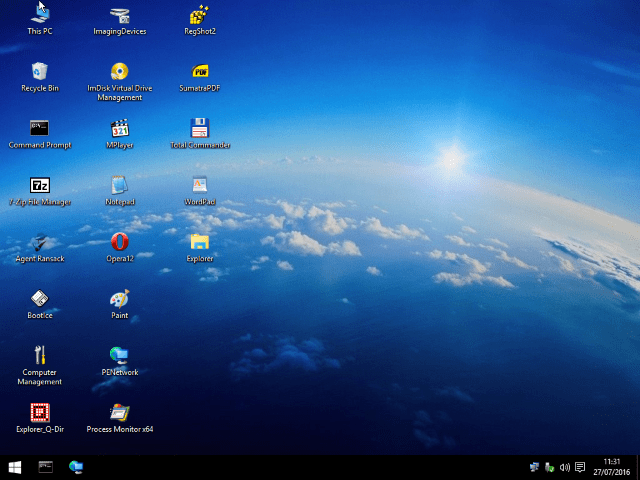
Win10PE SE v1.0.0.0 (September 1, 2016) [by TheOven/ChrisR] | 257.46 MiB
System Rescue Boot Tool for USB stick or DVD.
The Win10PE SE project provides a basis for building a PE environment using a Windows 10 ISO or DVD. Supports both 32-bit and 64-bit.
Take pleasure in personalizing it by adding your own applications.
Utilities included on this PE:
7-Zip
StartIsBack++
SumatraPDF
Notepad
WoW64
Rufus
Total Commander
Mozilla Firefox
Remote Desktop Connection
Media Player Classic-HC
Opera
BootIce
PStart
Sysinternals Process Monitor
Runscanner
... etc.
Changes on September 1: some minor improvements.
Language: English
Download: Direct Download Link (click on the "Complete" link)
Quick Manual: The content of the Windows 10 ISO file must be unpacked and copied to the HDD, as well as the zip package of Win10PE SE. After starting Win10PE SE click first on "Source" and select at "Source Directory" the folder where you copied the content of the ISO file of Windows 10. Then click in the menu on the left under "Utils" on "Extract Wim Folders" and go up on the tab "Script". Then click once on the green arrow and then click the "Gooooo" button. Now the necessary Windows files for the emergency stick are extracted from the ISO. If this is done, click on "Play". Finally, write the resulting ISO file on a USB stick: In the menu under the item "WriteMedia" you can create a USB stick with "Copy to USB Device BCD BOOTMGR".