Adware Removal Tool 4.1 portable
This post was published 10 years ago. Download links are most likely obsolete. If that's the case, try asking the uploader to re-upload.
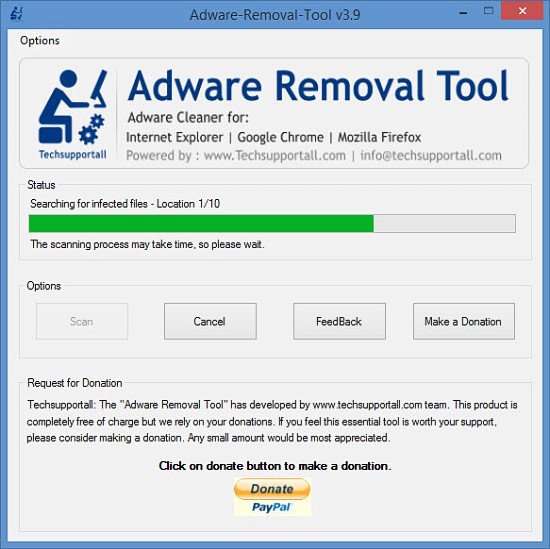
Adware Removal Tool 4.1 portable | 1 Mb
This tool can remove most of the Adwares from Internet Explorer, Firefox, Mozilla Firefox and from their registry traces as well.
Run the Adware Removal Tool executable and a very simple interface will show up. The part at the top explains that this is an adware cleaner tool for Internet Explorer, Google Chrome, and Mozilla Firefox. The part in the middle features buttons to launch a scan, provide feedback, and make a donation. The part down at the bottom explains why Techsupportall requests donations.
Using Adware Removal Tool is an incredibly simple matter. First up, you have to launch the application and click the Scan button. Mind you, the scan process may take a bit of time. It took around 8 minutes during my tests. Once the scan completes, you will be presented with a list of results; these are all the adware problems that Adware Removal Tool detected. With a simple mouse click you can then remove all these adware problems.
Please note that the removal process may close all currently running processes. It’s best to save your work before you run the removal process. You should also note that details about the repairs Adware Removal Tool performs will be saved in a log.
Adware Removal Tool can address adware issues that affect Mozilla’s Firefox, Google’s Chrome, and Microsoft’s Internet Explorer web browser.
Pros
Adware Removal Tool does not have to be installed; just run an executable to get it up and running. Using Adware Removal Tool is a simple process: scan, view scan results, repair. Adware Removal Tool is free software (consider making a donation).
Whats New
Updates: official site does not provide any info about changes in this version
HomePage