Portable Auntec RecMaster Professional 1.0.8.136
This post was published 6 years ago. Download links are most likely obsolete. If that's the case, try asking the uploader to re-upload.
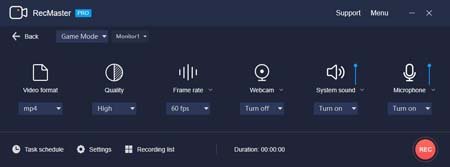
Portable Auntec RecMaster Professional 1.0.8.136|Packed in VMware ThinApp|Windows(x86/x64)|rar|101 mb
RecMaster is a professional and useful screen recording software.
Attention!
Dear users! We do not forget about our rights holders!
All portable assembly, designed exclusively for the promotion of the software and can be used for informational purposes only!
After testing the program and decide on the usefulness and necessity of you, this software - you are required! remove the assembly and turn to the developer, to purchase a license for a full version. Good luck!
Work on Windows 10 is POSSIBLE, BUT NOT GUARANTEED!
Release Notes
It supports accurate screen recording of any desktop activities such as desktop presentations, live webcasts, and business meeting videos. You can record full screen or custom area according to your needs. And the software also supports recording with the computer camera or webcam and recording audio only files. It allows you to complete the recording easily, efficiently and stably in different recording environments. It can also help you edit the recorded files by cutting, merging, and more. With this screen recorder, you can also set recording format, resolution, frame rate, camera output, audio output, etc. separately so that you can record all kinds of video content you want. It is the best choice for your work, study and entertainment.
One-click Made Screen Recording Simple
Built with five screen recording modes, RecMaster will offer you the easiest and most efficient way to record your computer screen. Just one click from RecMaster, enjoy every moment and details from your computer screen.
One-click for Multi-mode Recording
RecMaster comes with powerful features, like HD recording, picture in picture, schedule recording,etc. It will offer you the best experience for screen video recording.
Edit Recorded Clips Easily
Built with editing tools, RecMaster allows you to edit your video or add a custom watermark easily. Make sure your recording video will be perfect and instructive to your viewer.
Movement Effects for Cursor
You can choose different movement effects or colors for the cursor. You can also set a click sound or different colors for right and left click. Thus, it offers your viewer a more effective guideline.
Release New
No info
Homepage
System Requirements
- Restrictions: It does not correspond to the tablet mode.
- CPU: Intel® Pentium 4 or later / AMD Athlon 64 or later (900 MHz or greater)
- (64bit support recommended)
- Memory: 4GB or more (Recommend 8GB or more)
- HDD: 10GB or more of free disk space
- Display: XGA (1,024x768), Full Color (24 bit or higher), 16-bit display (32-bit recommended)
Windows XP, Windows Vista all SP, Windows 7, Work on Windows 10 is POSSIBLE, BUT NOT GUARANTEED!
Language English
Quick check before we show the links
Helps us keep automated scrapers from hammering the filehosts.