Portable Joplin Full 1.0.174.2317
This post was published 6 years ago. Download links are most likely obsolete. If that's the case, try asking the uploader to re-upload.
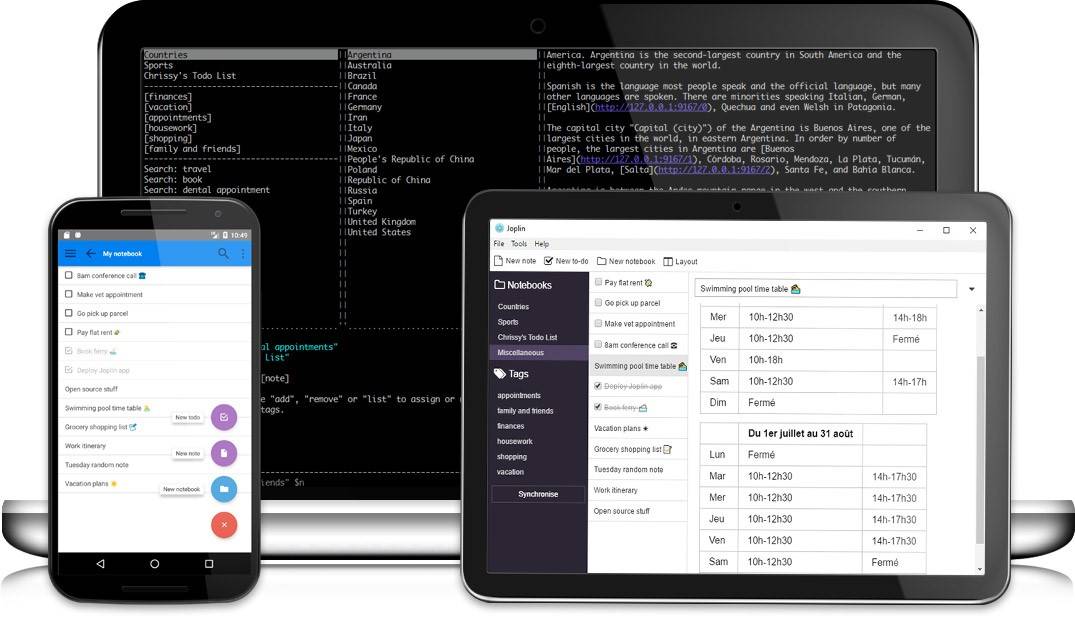
Portable Joplin Full 1.0.174.2317|Packed in VMware ThinApp|Windows(x86/x64)|rar|245 mb
Joplin is a note taking and to-do application, which can handle a large number of notes organised into notebooks.
Attention!
Dear users! We do not forget about our rights holders!
All portable assembly, designed exclusively for the promotion of the software and can be used for informational purposes only!
After testing the program and decide on the usefulness and necessity of you, this software - you are required! remove the assembly and turn to the developer, to purchase a license for a full version. Good luck!
Work on Windows 10 is POSSIBLE, BUT NOT GUARANTEED!
Release Notes
The notes are searchable, can be copied, tagged and modified either from the applications directly or from your own text editor. The notes are in Markdown format.
Notes exported from Evernote via .enex files can be imported into Joplin, including the formatted content (which is converted to Markdown), resources (images, attachments, etc.) and complete metadata (geolocation, updated time, created time, etc.). Plain Markdown files can also be imported.
The notes can be synchronised with various cloud services including Nextcloud, Dropbox, OneDrive, WebDAV or the file system (for example with a network directory). When synchronising the notes, notebooks, tags and other metadata are saved to plain text files which can be easily inspected, backed up and moved around.
The application is available for Windows, Linux, macOS, Android and iOS (the terminal app also works on FreeBSD). A Web Clipper, to save web pages and screenshots from your browser, is also available for Firefox and Chrome.
Features
• Desktop, mobile and terminal applications.
• Web Clipper for Firefox and Chrome.
• End To End Encryption (E2EE)
• Note history (revisions)
• Synchronisation with various services, including NextCloud, Dropbox, WebDAV and OneDrive.
• Import Enex files (Evernote export format) and Markdown files.
• Export JEX files (Joplin Export format) and raw files.
• Support notes, to-dos, tags and notebooks.
• Goto Anything feature.
• Sort notes by multiple criteria - title, updated time, etc.
• Support for alarms (notifications) in mobile and desktop applications.
• Offline first, so the entire data is always available on the device even without an internet connection.
• Markdown notes, which are rendered with images and formatting in the desktop and mobile applications. Support for extra features such as math notation and checkboxes.
• File attachment support - images are displayed, and other files are linked and can be opened in the relevant application.
• Search functionality.
• Geo-location support.
• Supports multiple languages
• External editor support - open notes in your favorite external editor with one click in Joplin.
Release New
Joplin changelog
v1.0.193 - 2020-03-08T08:58:53Z
• New: Added concept of provisional note to simplify creation and handling of newly created notes
• New: Add word counter feature to notes (#2444) (#160 by @jdrobertso)
• New: Added zoom controls to the application menu (#2162)
• New: Added Mermaid diagrams support (#2001)
• New: Add "add or remove tags" for multiple notes. (#2386) (#539 by @mic704b)
• New: Added new date format YYYY.MM.DD (#2318 by XSAkos)
• New: Added new, more secure encryption methods, so that they can be switched to at a later time
• Fixed: Handle invalid UTF-8 data when encrypting (#2591)
• New: Add more context to encryption errors
• Security: Fixed potential Arbitrary File Read via XSS (Reported by Javier Olmedo, fixed by Laurent Cozic)
• Security: Changed default encryption method to CCM
• Security: Change geolocation service to freegeoip.app to improve privacy (#2503 by Helmut K. C. Tessarek)
• Improved: Improve code css for Solarized Dark (#2626 by @rajprakash)
• Improved: Empty note body has 0 line count (#2623 by @jdrobertso)
• Improved: Use asar packing to improve performances (#2531 by @R-L-T-Y)
• Improved: Implement "show all notes" (#2472) (#262 by @mic704b)
• Improved: Create a screen that list all the resouces (#2189) (#592 by Georg Grab)
• Improved: Ensure tabs act like tabs and spaces act like spaces in editor. (#2508 by @mic704b)
• Improved: Update Electron to 7.1.12 (#2500 by Helmut K. C. Tessarek)
• Improved: Support export of multiple notes to PDF files. (#2468 by @mic704b)
• Improved: Use current year in About box (in the copyright text) (#2466 by Helmut K. C. Tessarek)
• Improved: Show master instead of HEAD as branch in about box (#2465 by Helmut K. C. Tessarek)
• Improved: Sort tags in drop-down list (when adding tags) (#2453 by Helmut K. C. Tessarek)
• Improved: Support scrolling in the note list using keys (eg page up, page down) (#2404 by @mic704b)
• Improved: Do not select pasted text no matter the paste method (#2431 by @mic704b)
• Improved: Support list creation on multi-line selections (#2408) (#1014 by @mic704b)
• Improved: Allow --no-sandbox flag to go around AppImage limitation (#2436 by Vaidotas Simkus)
• Improved: Reset time fields when duplicating a note (#2428 by Andrey Dolgov)
• Improved: Improved Note search bar UI (#2329 by @mic704b)
• Improved: Emphasise note title (#2311 by @mic704b)
• Improved: Support "select all" in the note list (#2403 by @mic704b)
• Improved: More info for "unknown profile version" error message (#2361 by @mic704b)
• Improved: Handle Thai language in search (#2387) (#2279 by Kirtan Purohit)
• Improved: Improve appearance of note Info dialog
• Fixed: Fix issue with disappearing button labels in toolbar (#2619) (#2615 by @anjulalk)
• Fixed: Fix window dimensions and position when the application starts (#2514) (#2476 by Daulet Amirkhanov)
• Fixed: Improved detection of selected text when applying formatting (#2582) (#2573 by @Rishgod)
• Fixed: Speed up WebDAV and Nextcloud Sync on Linux (#2577) (#1023 by @WisdomCode)
• Fixed: Fix to update tag list when note is deleted. (#2554 by @mic704b)
• Fixed: Fix Resources menu item on macOS (#2530 by Helmut K. C. Tessarek)
• Fixed: Fixed search bar text not visible in dark mode
• Fixed: Better handling of rare error in WebDAV server (#2485)
• Fixed: Fixed note renderer asset caching issue
• Fixed: Add new Katex fonts to improve rendering (#2478) (#2477 by Helmut K. C. Tessarek)
• Fixed: Fix .desktop file & force refresh (#2479 by Brandon Wulf)
• Fixed: Fixed incorect location format (#2480 by @anjulalk)
• Fixed: Fix importing of very large attachments (150MB+) from Evernote ENEX files
• Fixed: Fix to update the note list if the selected tag is deleted. (#2398 by @mic704b)
• Fixed: Fix alignment of checkboxes and other list items in rendered note (#2277)
• Fixed: Fix slow rendering and memory leak issues with Katex notes (#2357)
• Fixed: Fix rendering of certain letters in Katex. Fixed printing when note contains Katex code (#2374)
• Fixed: Fix markdown export (#2463) (#2455 by @mic704b)
• Fixed: Fix escaping of title when generating a markdown link (#2456) (#2085 by Helmut K. C. Tessarek)
• Fixed: Fix rendering of tabs in code blocks (#2446) (#2330 by @mic704b)
• Fixed: Do not show "could not print" warning dialog after cancelling print. (#2410) (#2407 by @mic704b)
• Fixed: Fixes long lines warpped (#2447 by Amit singh)
• Fixed: Ensure the main window is hidden when Joplin starts (#2432) (#2365 by 0xCLOVER)
• Fixed: Fix hang when selecting tag when multiple notes are selected (also for search) (#2372 by @mic704b)
• Fixed: Apply userstyle again when exporting to PDF or printing (#2324)
• Fixed: Fixed update message box
• Fixed: Fix identification of note in pdf export from main menu. (#2323 by @mic704b)
• Fixed: Fixed bad table rendering with multitable (#2352)
• Fixed: Fixed issues with Katex and MultiMd table plugin (#2339)
• Fixed: Fix Linux installation script (#2333 by Carl Bordum Hansen)
Homepage
System Requirements
- Restrictions: It does not correspond to the tablet mode.
- CPU: Intel® Pentium 4 or later / AMD Athlon 64 or later (900 MHz or greater)
- (64bit support recommended)
- Memory: 4GB or more (Recommend 8GB or more)
- HDD: 10GB or more of free disk space
- Display: XGA (1,024x768), Full Color (24 bit or higher), 16-bit display (32-bit recommended)
Windows XP, Windows Vista all SP, Windows 7, Work on Windows 10 is POSSIBLE, BUT NOT GUARANTEED!
Language Multilanguage(Russian English)
Quick check before we show the links
Helps us keep automated scrapers from hammering the filehosts.