Amacsoft PDF Converter 2.1.11 Multilingual Portable
This post was published 9 years ago. Download links are most likely obsolete. If that's the case, try asking the uploader to re-upload.
File Size: 22 MB
7-in-1 Powerful yet Affordable PDF Converter! Amacsoft PDF Converter is a must-have tool for home users and small businesses to transform PDF files at hand into documents, photos and even web pages with quick speed and high quality. The powerful yet affordable PDF converting software features with friendly interface and mighty functions, which is able to make conversions with several clicks. It possesses many wonderful features as below.
- Convert PDF to ePub, Word, PowerPoint, Excel, Image, HTML and Text files in high speed;
- Fully preserve the arrangement of text, images, graphics, tables, hyperlinks, layout and formatting in the source PDF file;
- Allows you freely to choose batch conversions or partial conversion;
One Click to Convert PDF to 7+ File Formats
PDF is a popular cross-platform file format that widely used in studying and working. However, it is not friendly for reading on portable devices and also troublesome to be editing. This is why you need a PDF converting tool.
* It supports converting PDF files to 7 types of common documents, such as Microsoft Word docs, PowerPoint pptx, Excel xlsx, ePub eBooks, HTML webpages and TXT files.
* Be able to export PDF as image formats. All commonly used image formats are supported, including JPG/JPEG, PNG, GIF, BMP, TIFF, etc.
Supplies Batch & Partial Conversion Modes
* Batch converting 200+ PDFs
To save your time and energy, the program provides considerate batch converting mode that allows you to convert as many PDF files as you like in one conversion.
* Partially converting selective PDF
Don't want to convert the whole PDF eBook? You can perform partial conversion by customizing the page number or page ranges to convert selective PDF pages.
Zero Quality Loss in the Process of Conversion
PDF format is ideal for keeping file layout on different platforms. Thinking about this PDF feature, Amacsoft PDF Converter uses high preserving technology to make sure what you see is what you get.
* No matter how complex your PDF file is, the output Word, ePub, Image, Text or HTML files will as same as the original PDF files.
* Preserve the original text contents, layouts, formatting, hyperlinks, images, etc. in the output files without any quality losing.
Preview PDF Files Before Converting
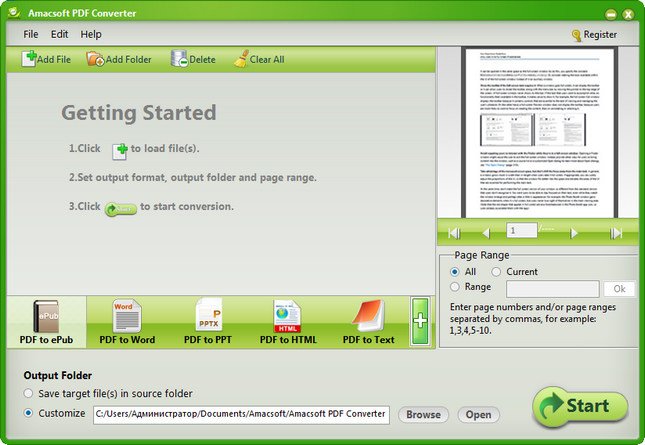
* Here is a small preview window on the right of the interface, allowing you to preview the imported PDF files page by page so that you will be able to confirm if you have loaded the right PDF and which page need to be converted.
* Under the preview window, here is a customize section where you can customize and define the page range or page ranges for performing a partial conversion mode. Just input the page number of specify page range, you will only get the selected PDF pages converted.
Updates: official site does not provide any info about changes in this version
Homepage
Quick check before we show the links
Helps us keep automated scrapers from hammering the filehosts.