Portable Sizer 4.556
This post was published 9 years ago. Download links are most likely obsolete. If that's the case, try asking the uploader to re-upload.
Portable Sizer 4.556|Windows(x86/x64)|rar|13.9 mb
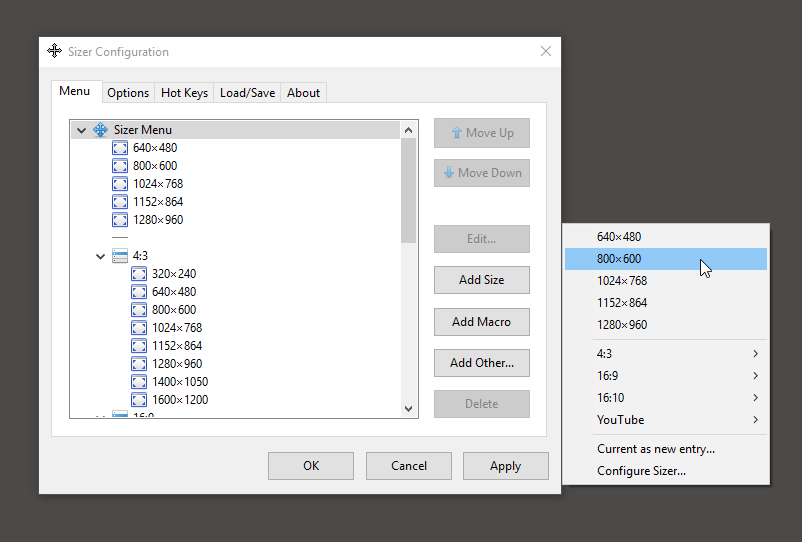
Sizer is utility that allows you to resize any window to an exact, predefined size. This is extremely useful when designing web pages, as it allows you to see how the page will look when viewed at a smaller size. The utility is also handy when compiling screen-shots for documentation, using Sizer allows you to easily maintain the same window size across screen grabs.
Attention!
Dear users! We do not forget about our rights holders!
All portable assembly, designed exclusively for the promotion of the software and can be used for informational purposes only!
After testing the program and decide on the usefulness and necessity of you, this software - you are required! remove the assembly and turn to the developer, to purchase a license for a full version. Good luck!
Work on Windows 10 is POSSIBLE, BUT NOT GUARANTEED!
Release Notes
Sizer should work on all 32 bit Windows operating systems (including Vista and Windows 7). You may experience issues and incompatibility so please consult the FAQ before contacting the author
The program should be straightforward to use. A comprehensive user guide is available if you need to know more.
Release New
• Better compatibility. Sizer has been completely rewritten to improve compatibility with modern applications including Windows 10 Apps. Sizer 4.0 is less intrusive than previous versions and therefore is more stable. Unfortunately this increased stability comes at a small price, some infrequently used features have been removed as a result. See the more details page for further info.
• Hot keys. Sizer actions, including bringing up the main resizing menu, can be assigned to a hot key that can be used at any time. e.g. by default pressing Ctrl+Win+Z brings up the Sizer context menu. This saves you hunting out the window border to right click it.
• Macros and expressions. Specify sizes and positions as formula. e.g. 0.7 * w:mon results in a value that is 70% of the width of the current monitor. With macros you can position several windows at the same time allowing you to layout multiple applications the way you want them. Further documentation will follow but in the meantime you can consult the railroad diagrams for details of the syntax.
• Menu groups. Simplify and tidy up the Sizer menu by creating cascading menus with groups.
• Portable. Run Sizer from a USB pen drive or keep your configurations in one place.
• Configuration file management. Export and import settings via the user interface.
Homepage
Quick check before we show the links
Helps us keep automated scrapers from hammering the filehosts.