Winstep Nexus Ultimate 15.9.0.1017 Multilingual
This post was published 10 years ago. Download links are most likely obsolete. If that's the case, try asking the uploader to re-upload.
Winstep Nexus Ultimate 15.9.0.1017 Multilingual | 39.8 Mb
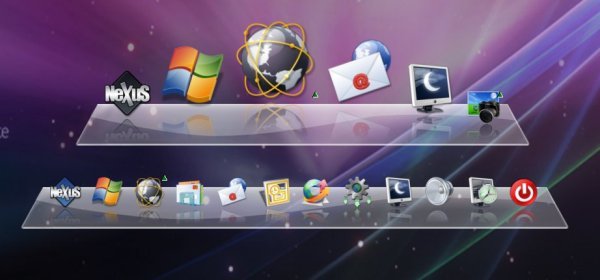
Nexus will help you with super fast access to your most frequently used applications, with flexible options allowing it to dock or float anywhere on the screen, providing a myriad of "on demand" possibilities. From it's generous use of situational sensitive context menus to it's advanced Drag & Drop support, Nexus is not only easy to use - it's a joy! Nexus Ultimate is an enhanced version of the free-to-use Nexus dock which is available stand-alone or as a component of Winstep Xtreme (a single easy-to-install package featuring all of Winstep's popular desktop enhancement products for Windows).
Features
- Display running applications on the dock with task grouping, filtering and icon customization options.
- Display system tray on the dock as single or grouped icons.
- Blur-Behind and colorization of dock backgrounds.
- Monitor active connections and bandwidth usage with Net Meter module.
- Get weather forecast for over 39,000 cities world-wide.
- Multiple mouse over effects: zoom, swing, bounce and more!
- Live icon reflections and animated water-like effects for reflections and dock backgrounds.
- Easily change appearence of icons of running programs and shortcuts by drag & dropping PNG, ICO and TIF files directly into the icon.
- Multi-monitor support.
- Compatible with skins for all 3rd party docks.
- Multiple docks and ability to group shortcuts into nested sub-docks.
- Duplicate, delete and disable/enable existing docks.
- Categorize applications into user-defined tabs on the Shelf (Tabbed Dock).
- Increase productivity by displaying the contents of folders, the Desktop, My Computer, Control Panel and more as tabs on the Shelf.
- Reduce clutter by hidding Desktop icons and using the Desktop tab on the Shelf instead.
- Display running tasks and system tray on the Shelf.
- One click theme switch with special Themes tab on the Shelf.
- Display modules (docklets) on the Shelf.
- Re-arrange tabs in the Shelf by drag & drop.
Whats New
New Features:
* Updated the Portuguese language file.
* Updated the French language file.
* Updated the Indonesian language file.
* Added new 'Action Center' internal command (Windows 10 only)
* The image of disabled docks & shelves now appear in grayscale on the Docks & Shelves tab of Preferences.
* Added 'Show folder in a menu' setting to folder type items in the Item Properties Editor, so shortcuts to folders can be browsed in a menu when clicked on an individual base.
* Auto-Hide delay has been extended from 100 ms to 5,000 ms in 100 ms intervals.
* Docks and Shelf no longer auto-hide while mouse pointer remains at the edge bump location.
* Edge bump delay now ranges from 0 to 2,000ms in 100 ms intervals.
* Added new 'Smoke' mouseover effect.
* Changed the hue of the live preview thumbnail glass background, to better fit with the Windows original.
* When installing a full setup version over an existing version, the user is no longer prompted to overwrite the default theme files.
* Reduced the font size used to display the theme's author in the Theme Preview window.
* Pressing CTRL while left clicking a shortcut now cycles through all the windows belonging to that same application when 'do not launch multiple sessions of the same application' is enabled.
* Pressing CTRL+SHIFT while clicking a shortcut causes the application to launch with Admin rights.
* Clicking the clock module now opens the Windows calendar instead of showing the Regional Settings dialog.
* The images of disabled docks in the Dock & Shelves tab of Preferences now appear in gray scale to help reinforce the fact that they are disabled.
* Increased the maximum width of menus by 100 pixels.
* Added 'Language Bar' internal command, which emulates the functionality of the Windows Language Bar. It changes dynamically, showing the active keyboard layout in the current foreground window, and allows switching to other keyboard layouts through a menu displaying all available language and keyboard layouts.
* Tray icon customization is now disabled by default to save resources.
* Double clicking a shortcut now launches a new session when 'Do not launch multiple sessions of the same application' is enabled.
* Added 'Always at the base of the icon' setting to the running indicator offset dialog. This forces the running indicator to always be shown below the icon independently of the current dock orientation.
* By default the running indicator is now 'Always at the base of the icon' and the indicator offset set to 30%.
* The Shelf now smoothly resizes when double clicking a Shelf tab to fully expand it or return it to the default number of rows, instead of changing sizes instantaneously.
* Renamed the 'WinstepXtreme.exe' multi-function helper application to 'Winstep.exe' to avoid confusing users of Nexus and Nexus Ultimate.
* Added multi-language support to the 'Winstep Key Manager' helper application.
* Added an optional new style to some UI elements (windows live preview thumbnail backgrounds, menu document thumbnail backgrounds, ballon tooltip background and the 'working' splash screen) to better fit with the default Windows 8 and Windows 10 look. Enabled by default on Windows 10 and 8.
* Added option in the More Options dialog of the General Preferences tab to enable the new Windows 10 style even when not running under Windows 10 or 8.
* Added 'Colorize with the dominant color of the desktop background'/'Wallpaper hot-track' setting to the colorization options of the docks and the Shelf, which automatically colorizes them to 'blend in' with the current desktop wallpaper.
* Added colorization settings to the Appearance tab of the Shelf Properties panel.
* The Explosion animation displayed when items are deleted can now be customized in the More Options dialog of General Preferences. User must specify a multi-frame PNG or TIF animation strip (animated icon).
* Moved the icon reflection and icon drop shaddow context menu options from the Effects menu to the Appearance and Sounds menu.
* Changed the appearance of the Aero style balloon tooltip.
* Improved the appearance of the Aero Style 'busy' splash screen.
* Added a 'Edge Bump Settings' button to the General tab of Preferences.
* Added ability to activate docks and the Shelf via 'edge swipes' instead of 'edge bumps.
* Added a new dialog to control edge swipe timings.
* Added a new setting to limit the distance the mouse pointer can travel during the activation delay for screen edge bumps. If the pointer moves behind this threashold while waiting to trigger an edge bump, the bump is discarded/ignored. This should help reduce accidental edge bump activations.
* Docks are now moved up in the z-order when mousing over them (if 'pop up on mouseover' is enabled) instead of removing focus from the currently active window. This provides a smoother experience since the active window does not change state.
* Added a 'Edge Swipe Settings' button the the General tab of Preferences and Dock Behavior panels.
* Added new 'Frequent Programs' tab type which displays the user's most frequently used applications.
* Added a 'Clear Recent Documents' internal command as the first item of a Recent Documents tab.
* Dock icons can now be combined with running application icons in the dock so there is no duplication of icons.
* By default clicking on a grouped running application icon now shows live window preview thumbnails instead of the group menu.
* Added option to show the group menu when clicking on the icon of grouped running applications instead of showing the live preview thumbnails.
* Added support for RK Launcher's Theme.conf skins.
* Theme tabs in Preferences now open immediately instead of waiting for theme files to be retrieved.
* Animation speed in the General tab of Preferences can now be set in 50 ms intervals.
* Added a default running indicator bitmap.
* The Windows hidden notification icons window is now monitored when open and automatically repositioned if it suddenly'jumps' to another location on the screen (as happened if the mouse pointer hovered over an invalid notification icon).
* The Shelf Tab Properties dialog now automatically gives a new tab an appropriate default name according to the currently selected tab type.
* Added option not to show icon reflections on vertical sub-docks.
* Added warning for Windows 8/10 users regarding the Glass Blur effect requiring the AeroGlass 3rd party utility.
* Added full support for high-DPI displays.
* Added option to automatically scale menus up on high DPI displays or not, as well as text in the Shelf.
* Icon shift routine in the Shelf is now an order of magnitude faster, which is especially noticeable when working with large, fully expanded, Shelf tabs.
* The Weather Module now automatically tries to retrieve the user's current location based on IP address when running for the first time.
* Added 'Get My Location' button to the Weather Module Preferences screen, which tries to get the user's current location (country, state, city, etc...) based on his IP address.
* Google killed their weather API, but weather forecasts for locations that do not have a Weather.com code (i.e.; only have a METAR code) can now be retrieved via MSN Weather.
* Changed defaults to: show running indicator on docks, running indicator offset at 30%, do not launch multiple instances, disable system tray icon customization and don't show icon reflections on vertical docks. When running under Windows 10: dock icon label background, outline and colorize according to dominant color of dock background are on, dock control icon color is Black Metal, UI base color is gray.
* Size of the UI font is now automatically reduced from point 10 to point 9 whenever a language other than English is selected to try and make up for the fact that translations from English are usually longer than the original text.
* Optimized the UI to try and prevent unchecked translations from over-running the available space.
Fixes:
* With the 'Do not launch multiple sessions of the same application' setting on, the dock was unable to restore minimized windows of applications running with elevated privileges.
* The 'Search' internal command was not working on Windows 8/10
* A Check for Updates was always performed every time the application started even if 'Notify me when new updates are available' was turned off.
* It was not possible to set the windows of folder type items to open maximized or minimized.
* With the 'Do not launch multiple sessions of the same application' setting on, launching a new instance of the application required a SHIFT + left click. This however caused the new window not to appear on the foreground because of Explorer enforced restrictions. To work-around this the new instance of the application is only launched when the user releases the Shift key.
* Fixed catastrophic bug that could cause multiple instances of WinstepXtreme.exe to run at the same time, maxing out the CPU, if the SHQueryRecycleBin function failed unexpectadly on a target system.
* The Shelf could sometimes enter drag & drop mode immediately after launching an application.
* With the 'Do not launch multiple sessions of the same application' setting on, the Shelf was still launching a new session if the item pointed to a shortcut instead of the executable itself.
* Fixes instances where the shelf would appear to 'jerk' when being resized (e.g. when expanding via a double click on a tab).
* The 'Colorize dock background' setting for individual docks wasn't sticking unless the tint color was applied globably from the main Themes tab in Preferences.
* Document thumbnails were sometimes not being displayed with the correct size (IEIFLAG_QUALITY was not being specified and the requested size would be ignored if the document had an embedded thumbnail).
* Thumbnails of PNG and TIF images did not maintain the original proportion when displayed next to a menu.
* Dock preview would not colorize for native Winstep themes when browsing Nexus themes via the Dock's Properties panel.
* When uninstalling a dead shortcut could be left behind in the 'Send To' folder.
* Fixed issue that would cause menus to close and open again on a second click instead of simply closing if already open.
* Fixed bug that could cause the dock to become stuck in an endless loop when de-magnifying.
* Stopped including the dock transparent areas in the calculations of the auto-hide/expand slide animation, which makes the dock seem to react much faster now.
* Dock no longer needs to complete the hiding animation before responding to an edge bump/slide.
* Fixed issue where tooltip of a single live preview thumbnail might not always be displayed.
* The 64 bit versions of equivalent 32 bit applications are now launched correctly instead of always launching the 32 bit version.
* Fixed annoying issue where the first mouse click on Preferences was ignored if Preferences wasn't the currently active window.
* Title of Wanda Settings window was 'Show cookie for' instead of 'Wanda Settings'
* It wasn't possible to set the secondary 'World' Email Checker style.
* Icon groups for system tray customization would sometimes 'break' into more than one group.
* The time in 24 hours format is now centered on the digital clock module.
* Fixed incorrect detection of 'Show Desktop' (WIN+D) being active when the user clicked on the desktop, which could cause various occasional z-order problems.
* System tray icons belonging to Session 0 processes were being saved with an empty process name in the tray icon cache.
* Corrected keyboard navigation tab order in the various UI configuration panels.
* Clicking the Start Menu Internal Command now properly closes the Start Menu if it is currently open and opens it otherwise.
* Using Aero Peek from a live thumbnail preview in a minimized Windows 10 App window caused that window to self-destruct.
* Minimized Metro App windows in Windows 10 disappearead from the tasklist.
* The Recent Documents tab was also showing non-document items under Windows 10.
* Fixed some issues with the description of Weather conditions being reported as 'N/A' in non-English languages.
Operating System: Windows XP/Vista/7/8/10