Unit Calculator Premium v3.0.0
Requirements: Android 7.0+ | Size: 23.6 MB
Unit Calculator is an all-in-one unit conversion app designed to simplify complex calculations across various categories. Whether you're working on scientific calculations, everyday conversions, or cooking measurements, Unit Calculator makes it easy and efficient—all without ads to interrupt your experience.
Key Features
Common Conversions
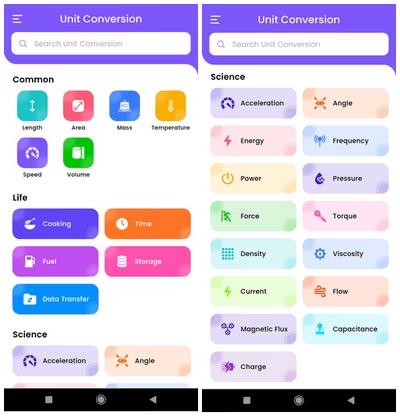
Convert between various units of Length (meters, inches, feet, etc.), Area, Mass, Temperature (Celsius, Fahrenheit), Speed, Volume, Life units, Cooking measures, Time, Fuel Efficiency, and Data Transfer.
Scientific Conversions
Ideal for engineers, students, and scientists. Convert Acceleration, Angle, Energy, Frequency, Power, Pressure, Force, Torque, Density, Viscosity, Electric Current, Magnetic Flux, Capacitance, Electric Charge, and more.
User-Friendly Interface
Each category is represented with clear and intuitive icons, making it easy to navigate and select the conversions you need.
No Ads, Full Focus
Enjoy a distraction-free experience with no advertisements. Focus on your conversions without interruptions.
Categories Available
Common
- Length
- Area
- Mass
- Temperature
- Speed
- Volume
- Time
- Cooking
- Fuel
- Data Transfer
- Storage
Science
- Acceleration
- Angle
- Energy
- Frequency
- Power
- Pressure
- Force
- Torque
- Density
- Viscosity
- Current
- Flow
- Magnetic Flux
- Capacitance
- Electric Charge
What's New
- No Changelog
Paid Info
● Supported Languages: af, am, ar, as, az, be, bg, bn, bs, ca, cs, da, de, el, en-AU, en-CA, en-GB, en-IN, en-XC, es, es-US, et, eu, fa, fi, fr, fr-CA, gl, gu, hi, hr, hu, hy, in, is, it, iw, ja, ka, kk, km, kn, ko, ky, lo, lt, lv, mk, ml, mn, mr, ms, my, nb, ne, nl, or, pa, pl, pt, pt-BR, pt-PT, ro, ru, si, sk, sl, sq, sr, sr-Latn, sv, sw, ta, te, th, tl, tr, uk, ur, uz, vi, zh-CN, zh-HK, zh-TW, zu;
● Supported Cpu Architecture: Armeabi-v7a, Arm64-v8a, X86_64;
● Supported Screen Dpi: None.
● Untouch Paid Apk With Original Hash Signature.
● Certificate MD5 Digest: 8158805feee99304975930562646c9db.
.Apks Bundle Installation
SAI Instructions:[No Root]
1. Download And Install Latest SAI App (Split APK Installer) -https://github.com/Aefyr/SAI/releases
2. Download this .apks Archive App;
3. Install And Open SAI / Choose "Install APKs" Button / Find And Select Downloaded .apks Archive App;
4. Wait For Install And Done. Enjoy!.
Lucky Patcher Instructions:[No Root]
1. Download And Install Latest Lucky Patcher App;
2. Install And Open Lucky Patcher And Choose 'Rebuild & Install';
3. Find And Select Downloaded This .apks Archive App;
4. Wait For Install And Done. Enjoy!.
PS: Make Sure After Open SAI or Lucky Patcher You Allowed Storage Permission And Install Unknown Apps Permission!
Quick check before we show the links
Helps us keep automated scrapers from hammering the filehosts.