Solid Explorer File Manager FULL v2.1.3 + Plugins (All Versions) Paid
This post was published 10 years ago. Download links are most likely obsolete. If that's the case, try asking the uploader to re-upload.
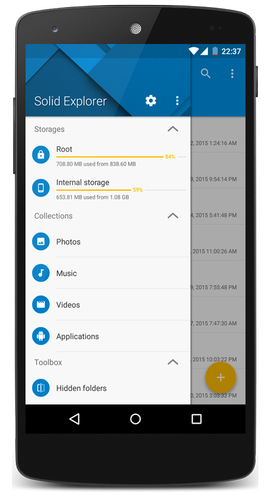
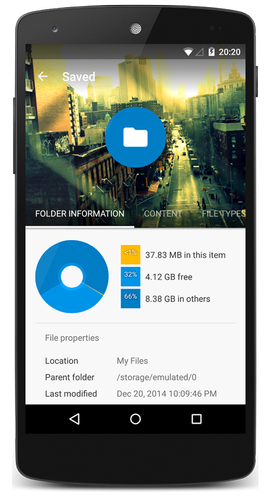
Solid Explorer File Manager FULL v2.1.3 + Plugins (All Versions) Paid | 9/3/2 Mb
Requirements: 4.1 and up
Overview: This is Solid Explorer File and Cloud Manager.
This is Solid Explorer File and Cloud Manager
Please note that this is a 14 day trial version
If you own the Solid Explorer Unlocker you can use the premium version for free!
Tl;dr:
- Material Design!
- Two independent panels serving as file browsers
- Rich customization options: icons sets, color schemes, themes
- Drag and Drop inside and between panels
- FTP, SFTP, WebDav, SMB/CIFS clients
- Ability to read and extract ZIP, 7ZIP, RAR and TAR archives, even encrypted
- Ability to create password protected ZIP and 7ZIP archives
- Cloud file manager: Dropbox, Box, OneDrive, Google Drive, Sugarsync, Copy, Mediafire, Owncloud, Yandex
- Root access makes Solid Explorer a fully functional root explorer
- Extensibility: more features in separate plugins available in Google Play
- Indexed search finds your files in a couple of seconds
- Detailed file information with storage usage statistics
- Batch rename: change names of multiple files at once using regular expressions and variables
- Useful tools: hiding unwanted folders, FTP Server (plugin), bookmarks, Chromecast support, media browser
Looking for a good file explorer with a sleek, modern look and many features? Good to see you here!
Solid Explorer is the best looking file and cloud manager with two independent panels, which brings to you a new file browsing experience.
This is the only fully featured file manager with Material Design you can find in the Play Store. It's better, faster and solid when compared to the competition. Apart from the ability to manage files in almost every location, it also gives you many customization options, such as themes, icon sets and color schemes. You can freely adjust the interface to match your taste. Dual pane file browsing with drag and drop greatly increases your productivity.
Solid Explorer is a great cloud file manager, because it provides you a wide support for cloud storages including Dropbox, Box, Google Drive, OneDrive, Mega and Owncloud. This file manager can also connect to your Windows PC and many remote servers working with FTP, SFTP and WebDav. By the way, you will appreciate the ability to create or extract most commonly used archive formats, such as ZIP, RAR and 7ZIP.
Maybe you're tired of ugly looking root explorer apps? This file manager will meet your needs. It features a root explorer with ability to change system level file properties. You don't need to remember about mounting file systems as read/write. Solid Explorer will do it for you automatically.
Solid Explorer is also a great file manager for viewing your media. It can arrange your photos, videos and music in one place for easy and quick access. It has a built in music player and image viewer, which even allow you to play remote content stored for example on your PC, Dropbox, OneDrive or Google Drive. The most cool thing is that the content can be casted to your Chromecast.
Just give it a try! You will not be disappointed.
WHAT'S NEW
2.1.3
- ability to create desktop shortcuts to Photos, Music, Videos and Apps (open the collection and select "Create shortcut" from the overflow menu)
- auto advance to the next song in the Music Player
- fixed SFTP connection issues with ProFTPD servers
- fixed random errors while copying system files
- fixed random crashes on Android 6
- updated translations
- minor bug fixes
This app has no advertisements
FULL version Unlocked | Google Drive works!
[hide] https://userscloud.com/9c59bje5kt1s
https://userscloud.com/oyshbcgitwuv
https://userscloud.com/hut1oruiyefh
https://dailyuploads.net/pzb3srv43xcx
https://dailyuploads.net/s39k8diiv7cd
https://dailyuploads.net/j96ouxkx8e34
http://ul.to/ysfidyob
http://ul.to/djegrtet
http://ul.to/hcfgx8a4
http://www.nitroflare.com/view/71B406B8EB8B8A5
http://www.nitroflare.com/view/75E4B7569747093
http://www.nitroflare.com/view/41651BF9695830C[/hide]